How to Borrow Load in Smart | Prepaid User Guide 2026
Short Answer:
To borrow load in Smart dial *123# or *767# and select a borrow option to get instant load for calls, texts, or data. You can also borrow via SMS to 7676 or through the Smart GigaLife app, with the amount plus a small fee deducted on your next reload.
Running out of load always seems to happen at the worst time right before an important call, an urgent text, or when you suddenly need mobile data. If you’re a Smart Prepaid user in the Philippines, you don’t need to panic anymore. In 2026, Smart offers an emergency credit service that lets you borrow load instantly when your balance is zero or very low. This borrowed load can be used for calls, texts, or mobile data, and the repayment is simple: Smart automatically deducts the borrowed amount plus a small service fee from your next reload.
This complete guide explains what Smart Borrow Load is, who is eligible, and all the working methods you can use today USSD codes, SMS keywords, and the Smart GigaLife app. You’ll also learn about charges, validity, limits, and what to do if borrowing isn’t available on your SIM.
What Is Borrow Load in Smart?
Borrow Load is Smart’s emergency prepaid credit service designed for users who temporarily run out of balance. Think of it as a short-term mobile load loan.
Once approved, Smart instantly adds load or promo credits to your account. This borrowed balance is not free a small service fee applies. The total amount is automatically deducted the next time you reload your SIM.
This service is mainly meant for:
Requirements to Borrow Load in Smart
Not every SIM is eligible. Smart checks a few conditions before approving a borrow request.
To qualify, you must meet all of these requirements:
If any of these conditions are not met, the borrow option may not appear or may be rejected.
How to Borrow Load in Smart (All Working Methods – 2026)
Smart currently provides three reliable ways to borrow load. You can choose based on whether you have internet access or prefer texting.
Borrow Load via USSD Code (*123#, *767#)
This is the fastest and most reliable method, especially if you don’t have mobile data.
Steps:
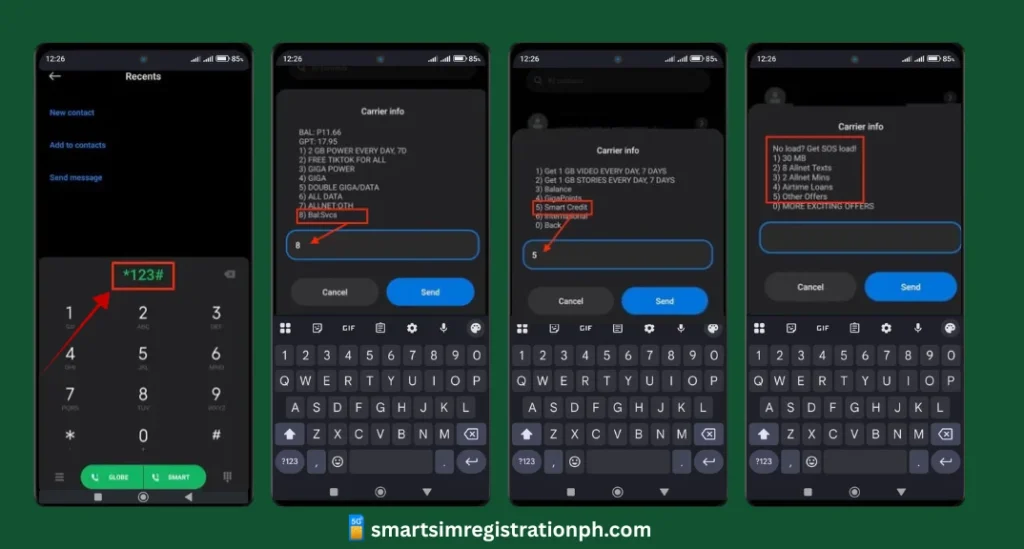
Your borrowed load will be added within seconds.
Tip:
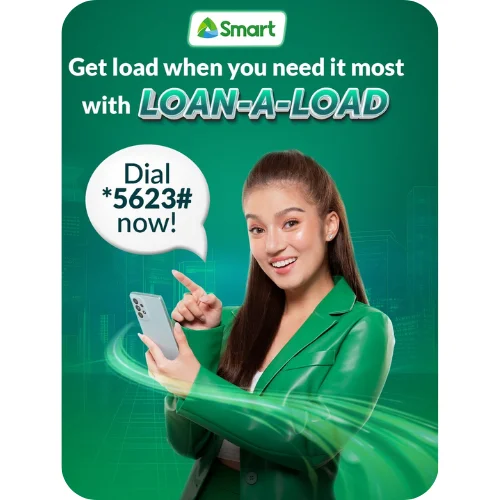
Dialing *5623# shows SOS packages for texts, calls, or combo promos. This is useful if you don’t remember SMS keywords.
Borrow Load via SMS (Text to 7676)
If you prefer texting, Smart also allows borrowing through SMS keywords.
How it works:
| Package | Keyword | What You Get | Deduction | Validity |
|---|---|---|---|---|
| BIG7 | SOS BIG7 | 9 texts (Smart/TNT) | ₱7 | 1 day |
| BIG10 | SOS BIG10 | Mixed texts | ₱10 | 1 day |
| SURF10 | SOS SURF10 | Light data + ₱1 load | ₱10 | 1 day |
| ALLOUT20 | SOS ALLOUT20 | Texts, calls, data | ₱24 | 1 day |
| ALLOUT30 | SOS ALLOUT30 | Bigger combo | ₱36 | 2 days |
| UCT30 | SOS UCT30 | Unlimited texts & calls | ₱36 | 1 day |
Tip for TNT users:
Use SAKLOLOAD instead of SOS (example: SAKLOLOAD SURF10).
Borrow Load Using the Smart GigaLife App
If you have internet access, the Smart GigaLife app offers the most convenient experience.
Steps:
Smart Borrow Load Amounts and Charges (2026)
Smart applies a small service fee depending on the amount you borrow.
| Borrowed Load | Service Fee | Total Deduction |
|---|---|---|
| ₱5 | ₱1 | ₱6 |
| ₱10 | ₱2 | ₱12 |
| ₱20 | ₱2 | ₱22 |
| ₱30 | ₱3 | ₱33 |
| ₱50 | ₱5 | ₱55 |
Example:
If you borrow ₱20 today and later reload ₱100, Smart will deduct ₱22, leaving you with ₱78 balance.
Important Things to Remember
What If Borrow Load Is Not Available?
If the borrow option doesn’t work on your SIM, you still have alternatives:
These options ensure you’re never completely disconnected.
Also Read: How to Pasaload Smart and TNT
Also Read: How to Convert Smart Postpaid to Prepaid
Also Read: How to Activate Smart SIM
Also Read: Smart SIM APN Settings 2026
Conclusion
Borrow Load in Smart in 2026 is a helpful emergency service for prepaid users who suddenly run out of load. It allows you to get instant credit for calls, texts, or data through USSD codes, SMS, or the Smart GigaLife App. The borrowed amount plus a small service fee is automatically deducted on your next reload. While availability depends on your SIM’s eligibility and usage history, it remains a convenient backup option to stay connected when you need it most.